Tips on Microphone Technique
Microphone Positioning
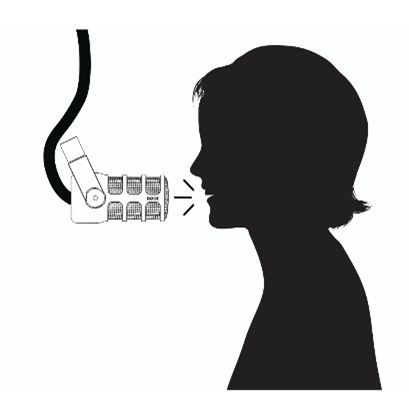
- Position your mouth 2-6 inches away from the microphone (about a fist width) for optimal sound capture.
- The microphone uses a cardioid polar pattern, which picks up sound best from the front. Always speak or sing into the end (not the side) of the microphone for optimal results.
Gain Adjustment
- Use the faders on the RØDECaster Pro II to adjust the gain until your voice registers clearly on the meters but avoids peaking into the red.
- Rehearse at full performance volume to set an appropriate gain level. This includes any parts where your voice might get louder or more intense.
- If you anticipate voice fluctuations, such as excitement or raised volume, adjust the gain to compensate for sudden peaks.
Managing Plosives
- Plosives (e.g., hard ‘B’ and ‘P’ sounds) can overload the microphone and create popping noises.
- Monitor with headphones to hear and adjust for plosives in real time.
Using the Proximity Effect
- The closer you get to the microphone, the more bass frequencies are enhanced (this is called the proximity effect).
- Use this effect strategically to create a richer, more intimate sound when podcasting or singing.
- Practice moving closer and farther from the mic while adjusting your vocal volume for dynamic expression and clarity.